Save your vehicle settings
Save up to three vehicles, including their fuel type, economy and tank details, for future route and detour estimates on any plan.
More than just a fuel finder
Compare UK petrol and diesel prices nearby or along your route. Enter your MPG and fill amount to estimate what a cheaper stop saves after the extra driving.
Enter a UK postcode or choose a town or city, then compare prices for the fuel your vehicle uses.
Price checks run every 5 minutes using Government and retailer updates.
Your fill. Your car. Your route.
A cheaper pump price is only part of the decision. Smart Savings subtracts the estimated fuel used on the extra drive from the saving on your fill-up.
The same price difference means more on a large fill than a small top-up.
Your MPG changes the estimated fuel cost of the extra miles.
Road routes are used where available. Fast estimates are labelled separately.
For a 10-litre top-up, the same 40p/litre gap saves £4.00 at the pump. The £5.30 extra-fuel cost means spending about £1.30 more overall.
Start with the right fuel grade, then compare the price and the extra drive. The website offers free nearby and route searches; the app also keeps your saved vehicles, fill-ups and live traffic checks together within your plan allowance.
Compare nearby station prices on the Explore map, switch to the list and open a station for more detail. Choose the fuel grade your vehicle needs, including premium petrol and diesel.
Try the free postcode search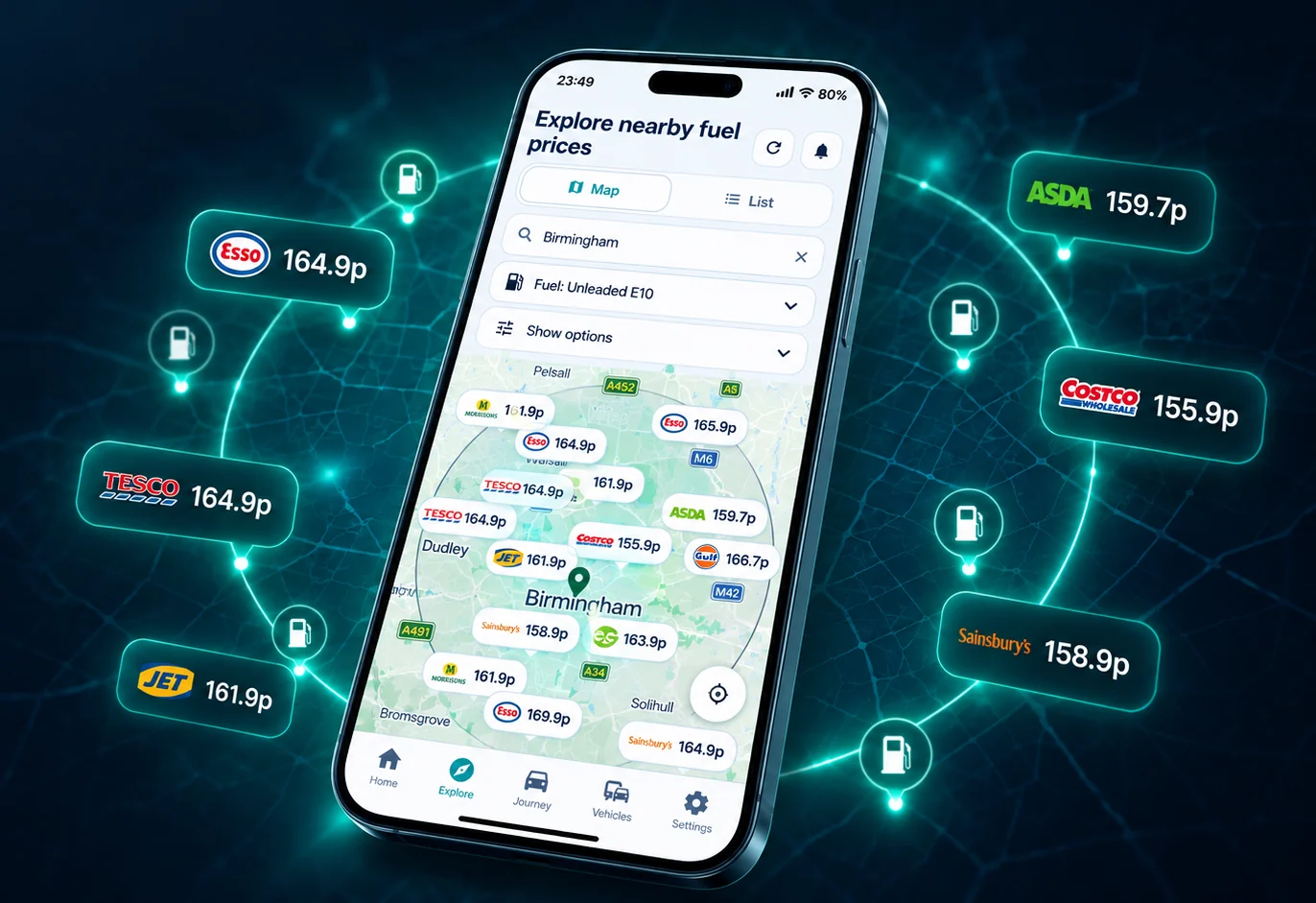
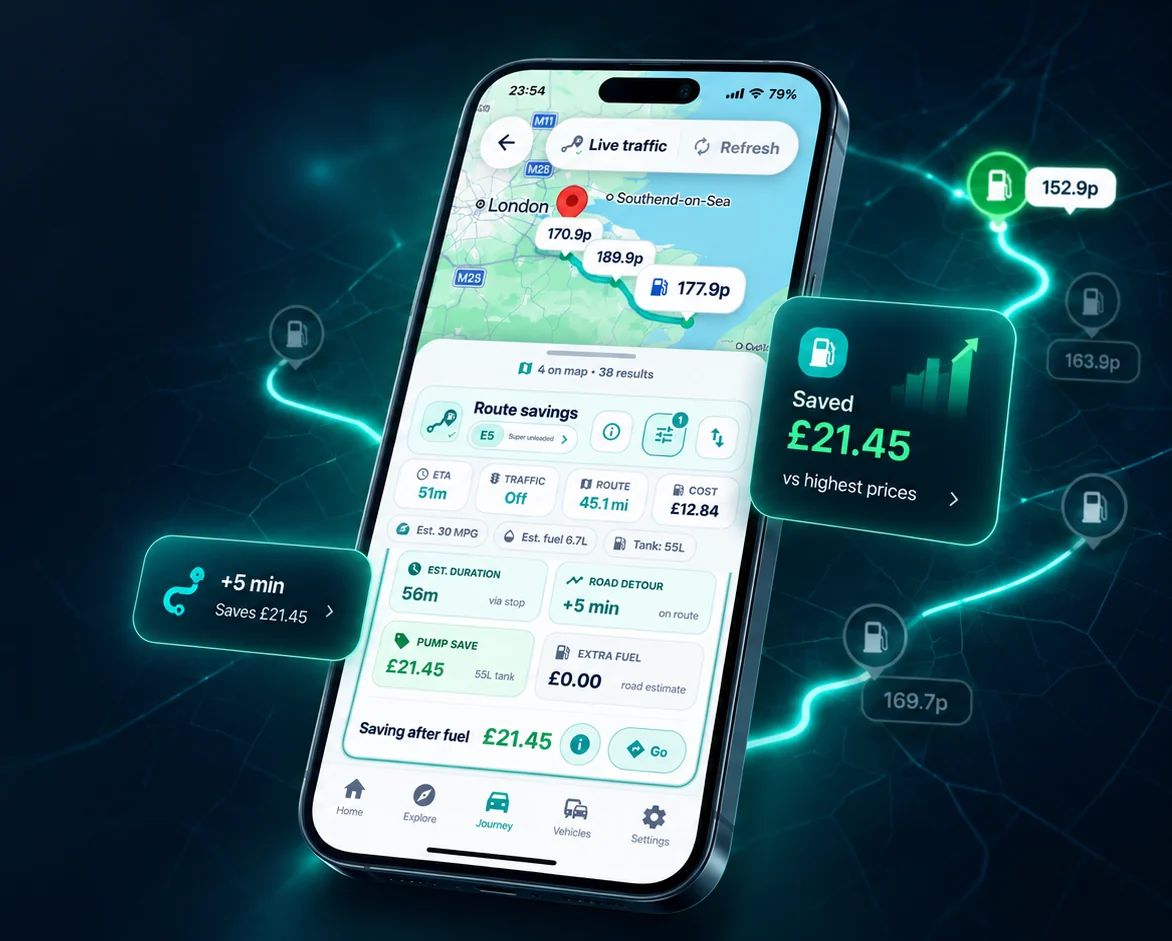
A station can look close on the map while the road takes a longer way round. Road estimates compare driving routes where available, including the extra miles needed for the stop; fast estimates are labelled separately. Smart Savings subtracts the estimated detour fuel from the pump saving.
Turn on Live Traffic for traffic-aware ETA and detour checks, subject to coverage and your plan allowance.
Explore the fuel route plannerFrom comparison to directions
Google Maps now shows UK fuel prices. Route & Fuel helps you compare the estimated saving for your own fill amount, MPG and extra drive before choosing a stop.
Open the chosen station in Google Maps and check the route before setting off. Route & Fuel is independent; this handoff does not import or synchronise a Google Maps route.
How Route & Fuel works with Google MapsBoth store listings offer a free download with optional Plus and Pro subscriptions. Check your store for device compatibility, the current app version and purchase terms.



Install from Google Play for Android. Compare nearby prices, plan fuel stops and open your chosen station in Google Maps. Google Play shows compatibility for your device.
Android app details
The App Store listing supports iPhone and iPad with iOS or iPadOS 16.4 or later. Use the same price, journey and vehicle tools on your Apple device.
iOS app detailsThe app keeps your preferences and fuel records together, so you can build on each price check.
Save up to three vehicles, including their fuel type, economy and tank details, for future route and detour estimates on any plan.
Keep a favourite station on Free. Plus and Pro add more favourites and price alerts, so you can follow the stations you use regularly.
How fuel price alerts workSave litres, prices and journey details to review fuel spend and calculated savings over time.
How savings are calculatedThe website’s postcode search and route planner are free. Every app plan uses the same station-price dataset.
Station prices, maps, route planning and saved vehicles. Includes one weekly live traffic check and limited saved records. Contains ads; price alerts are not included.
Add price alerts, more favourites and saved records, five weekly live traffic checks and fewer ads.
Get the highest saved-item limits, up to ten price alerts, fourteen weekly live traffic checks and an ad-free app.
Live traffic is subject to coverage and your plan allowance. Plus and Pro are optional auto-renewing subscriptions; your app store shows prices, billing periods and cancellation terms before purchase.
Use the app while safely parked or plan before setting off.
It depends on the price difference, how much fuel you buy, your MPG and the extra road miles. Smart Savings estimates the pump-price saving minus the fuel used on the detour. Time, tolls and crossing charges are separate.
Compare fuel prices and estimated detour savings in Route & Fuel, then open your chosen station in Google Maps for directions. Check the route before setting off. This does not automatically import or synchronise a Google Maps route.
Yes. Route & Fuel is an independent UK fuel finder app and website for iPhone, iPad and Android. It combines nearby station prices with route and detour checks.
Yes. The website provides a free postcode and current-location search. Each result can open a detailed station page or Google Maps.
Smart Savings compares the pump saving with estimated detour fuel costs and your vehicle’s MPG. Road estimates use driving routes where available; fast estimates are labelled separately. Live traffic checks add traffic-aware ETA and detour information within your plan allowance.
Yes. Route & Fuel is available from Google Play for Android and from the App Store for iPhone and iPad.
Yes. Free includes station prices, the map, route planning and vehicle records. Optional Plus and Pro subscriptions add price alerts, higher saved-item limits and more live traffic checks. Your app store shows the exact subscription price and terms before purchase.
No. Route & Fuel is an independent third-party app and website. It explains where prices come from and shows last-updated times so drivers can judge price age.
Search a postcode or current location, compare the fuel grade your vehicle uses and open station details. For a longer drive, enter a start and destination in the free route planner to compare station prices with the fuel used on a detour.