Google Maps fuel prices: how Route & Fuel fits your journey
See the price in Google Maps. Check whether the stop saves you money with Route & Fuel. Then open directions to the station you choose.


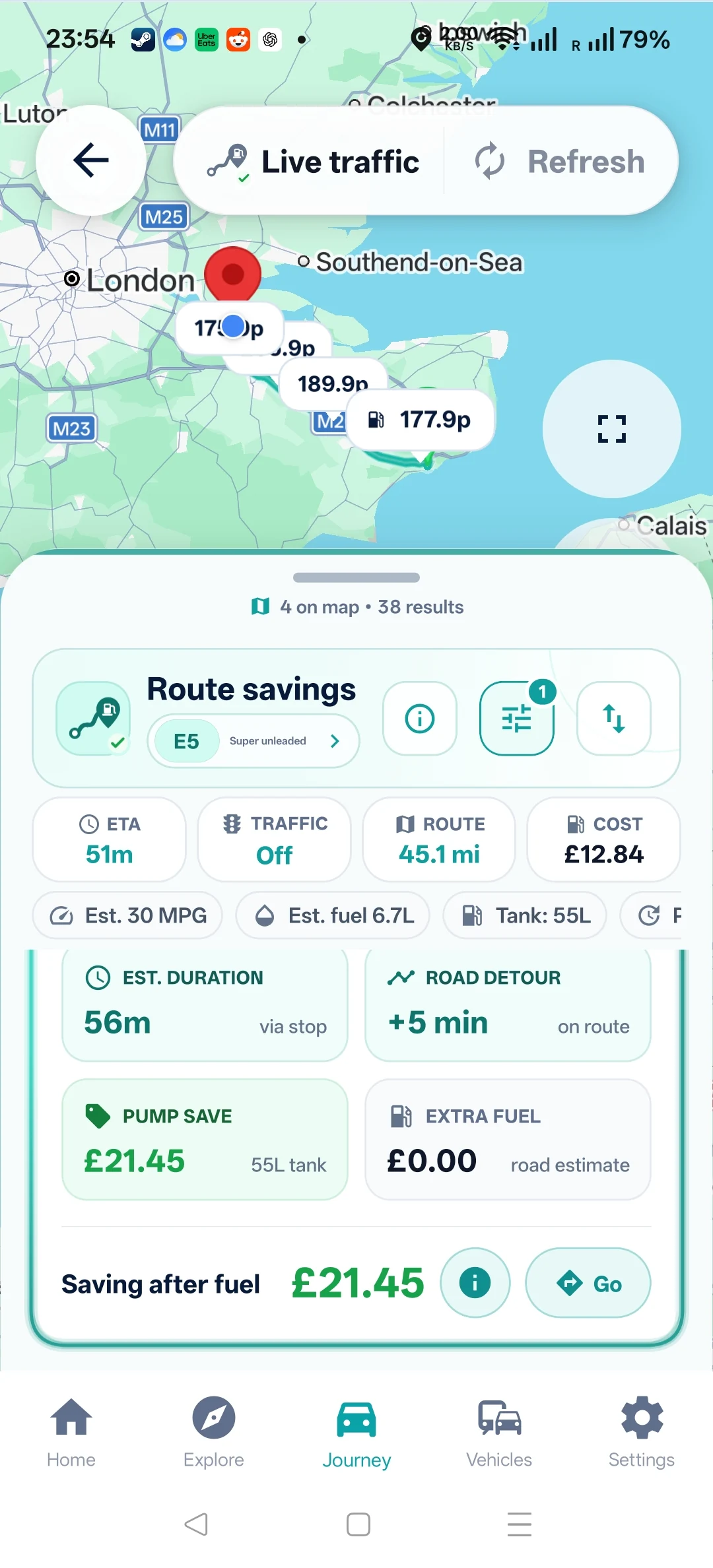
Google Maps now displays near real-time UK petrol and diesel prices using the Government’s Fuel Finder data. Route & Fuel complements that price check by estimating the saving after the fuel used on a detour, using your MPG and the amount you plan to buy. Choose a stop, then open it in Google Maps for directions.
How to see fuel prices in Google Maps
Search Google Maps for “petrol” or “fuel”, compare the prices shown on the map, then open a station to see its fuel grades. Use the same grade for each comparison and confirm the price at the pump before buying. Google’s announcement explains the new price search.
A lower pump price is useful—but the extra drive also costs fuel. Your MPG and planned fill amount determine how much of the saving remains.
See the app example
On this page
What changed in Google Maps?
On 8 October 2026, the UK Government announced petrol and diesel prices in Google Maps. Drivers can search for a nearby forecourt and see listed prices before deciding where to fill up.
That makes checking a local pump price easier in a navigation app many drivers already use. The next question is personal: is the cheaper station worth the extra drive for your car and this fill-up?
Choose a station in Route & Fuel, then open it in Google Maps for directions. Route & Fuel is an independent app; it does not imply a Google partnership, automatic route import or that Route & Fuel supplies Google’s fuel prices.
Check fuel prices near you
Enter a full UK postcode or choose a suggested town. Compare the grade you need, then check whether a cheaper stop fits your journey.
Choose a town suggestion or enter a full UK postcode. Results open in the free website fuel finder. Already planning a journey? Compare stops along your route.
How to use Route & Fuel with Google Maps
- Check prices for the correct fuel. Look up a local forecourt in Google Maps, or use the Route & Fuel search above. Compare the same grade at each station.
- Enter your journey in Route & Fuel. Use your start, destination, vehicle or UK MPG and planned fill amount. Enter the journey details separately; this is not an automatic import from Google Maps.
- Compare the whole stop. Check the pump-price saving, extra road distance and estimated fuel used on the detour. Road distances matter when a river, one-way road or motorway exit makes a station harder to reach. Some distances are estimates; check the label beside each result.
- Open your chosen station in Google Maps. Use the directions action after deciding on the stop. Check the navigation route and pump price before buying. Plan before setting off or while safely parked.
| Your question | Google’s announced fuel feature | Use Route & Fuel to check |
|---|---|---|
| What does the forecourt charge? | Listed near real-time petrol and diesel prices when you search for a nearby forecourt. | The fuel grade, price-change time and station details alongside nearby or route results. |
| What could I save on this fill? | A price per litre to compare. | The price difference multiplied by your planned litres, minus estimated detour fuel cost. |
| Does it suit this journey? | A forecourt location you can navigate to. | Fuel stops along your planned route, extra driving and the assumptions behind the saving. |
Google Maps also offers navigation, traffic information and fuel-efficient route choices. This comparison focuses on the saving after estimated extra fuel, using your MPG and planned litres.
A cheaper pump price is only part of the saving
For an illustrative larger fill-up, suppose a station is 40p per litre cheaper and you plan to buy 70 litres. That saves £28.00 at the pump. If reaching it adds 20 miles in total, subtract the fuel for that extra driving. This is not a typical or guaranteed saving.
At 30 UK MPG, the 20 extra miles use about 3.03 litres. At an assumed £1.75 per litre, the extra fuel costs about £5.30. Calculation: 20 ÷ 30 × 4.54609 × £1.75 ≈ £5.30. These are illustrative inputs, not current prices or a promised saving. The 20 miles already include the full extra driving; do not double them. Time and other costs are separate.
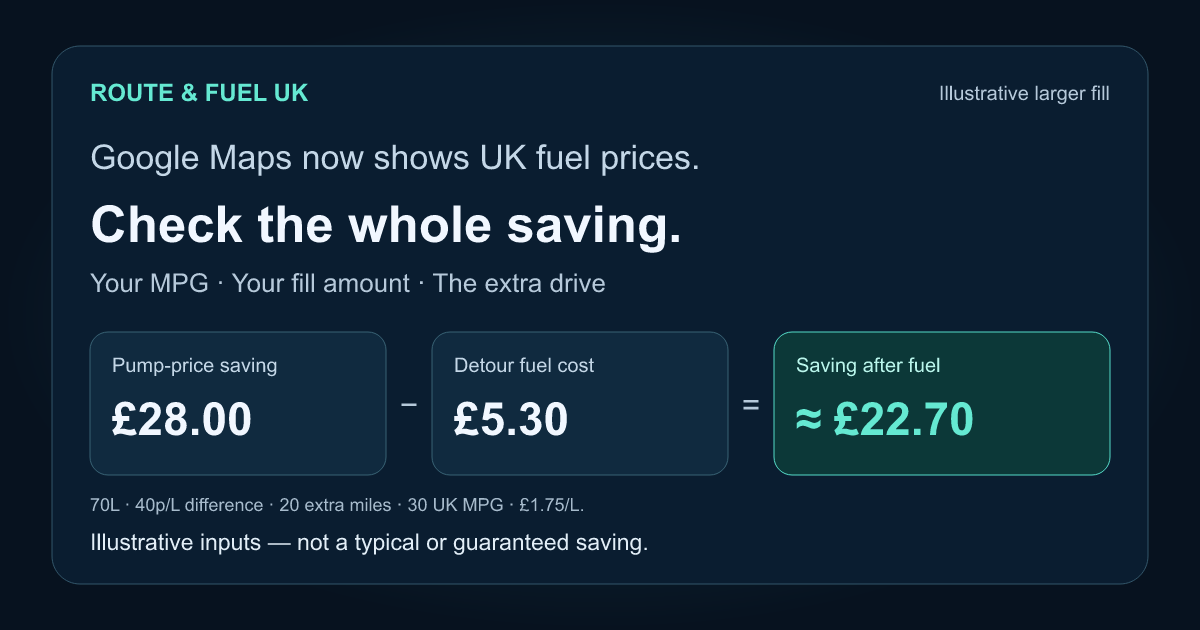
For a 10-litre top-up, the same 40p/litre gap saves £4.00 at the pump. The same £5.30 extra-fuel cost leaves you about £1.30 worse off. Your fill amount changes whether the trip is worthwhile.
Extra time is shown separately from fuel saving. Tolls, crossing charges and the value of your time are separate costs. Read how Route & Fuel calculates savings or try the journey cost calculator with your own inputs.
Try the website, then keep your settings in the app
The free website offers nearby price searches, a fuel route planner and journey cost calculations. You can compare a stop before installing anything.
The Android and iPhone app adds saved vehicle settings, favourites and journey and fill-up records. Price alerts are available on eligible plans. Live-traffic checks use your plan allowance; a website comparison does not include the app’s live-traffic feature. See Free, Plus and Pro for current limits.
How fresh are the fuel prices?
Under the Government’s Fuel Finder scheme, forecourts must report a fuel-price change within 30 minutes. The official data guidance explains that the feed includes prices by fuel type, forecourt details and update timestamps.
That reporting deadline is not a guarantee that every app updates at exactly the same moment. Route & Fuel schedules UK data checks every five minutes; individual station price times and processing delays vary. An older price-change timestamp can simply mean the retailer has kept the same price. Check the displayed pump price before filling up.
Google Maps fuel-price questions
Does Google Maps show UK petrol and diesel prices?
Yes. The UK Government announced near real-time petrol and diesel prices in Google Maps on 8 October 2026, using Fuel Finder data. Search for a nearby forecourt in Google Maps to check its listed prices.
Why use Route & Fuel alongside Google Maps?
Use Route & Fuel to compare the price difference with your fill amount, UK MPG and extra driving. After choosing a stop, open it in Google Maps for directions.
Is Route & Fuel officially partnered with Google Maps?
Route & Fuel is an independent app. Its directions hand-off opens your chosen station in Google Maps. This does not make Route & Fuel a Google partner or a source of the fuel prices displayed in Google Maps.
Does Route & Fuel automatically import my Google Maps route?
No. Enter your start and destination in Route & Fuel, compare stops, then open the chosen station in Google Maps.
Are UK fuel prices updated instantly?
The reporting requirement is within 30 minutes of a price change. Reporting and processing take time, so a near real-time listing is not a guarantee of the price at arrival. Check the displayed pump price before buying.
Can I compare prices without downloading the app?
Yes. The free Route & Fuel website lets you search nearby prices, compare fuel stops along a route and calculate journey costs. The app adds saved vehicle settings and records, with price alerts and traffic allowances depending on your plan.
Sources and further reading
Google: find UK fuel prices with Google Maps and Waze, 8 October 2026.
- GOV.UK: Drivers set to save as petrol prices launch on Google Maps, published 8 October 2026
- GOV.UK: access the latest fuel prices and forecourt data
- Route & Fuel: where our prices and station data come from
- Route & Fuel: savings inputs, assumptions and limits
Find a stop that works for your journey
Compare the fuel price with the extra drive. Save your vehicle settings in Route & Fuel, then open directions to your chosen station.